Plan and billing
Use Plan and billing to compare plans, change your Shopify subscription, and review your usage.
What you can do here
Section titled “What you can do here”- Compare all four plans side by side.
- Change your plan.
- See how many shopper visits and result rules you’ve used this month.
Compare plans
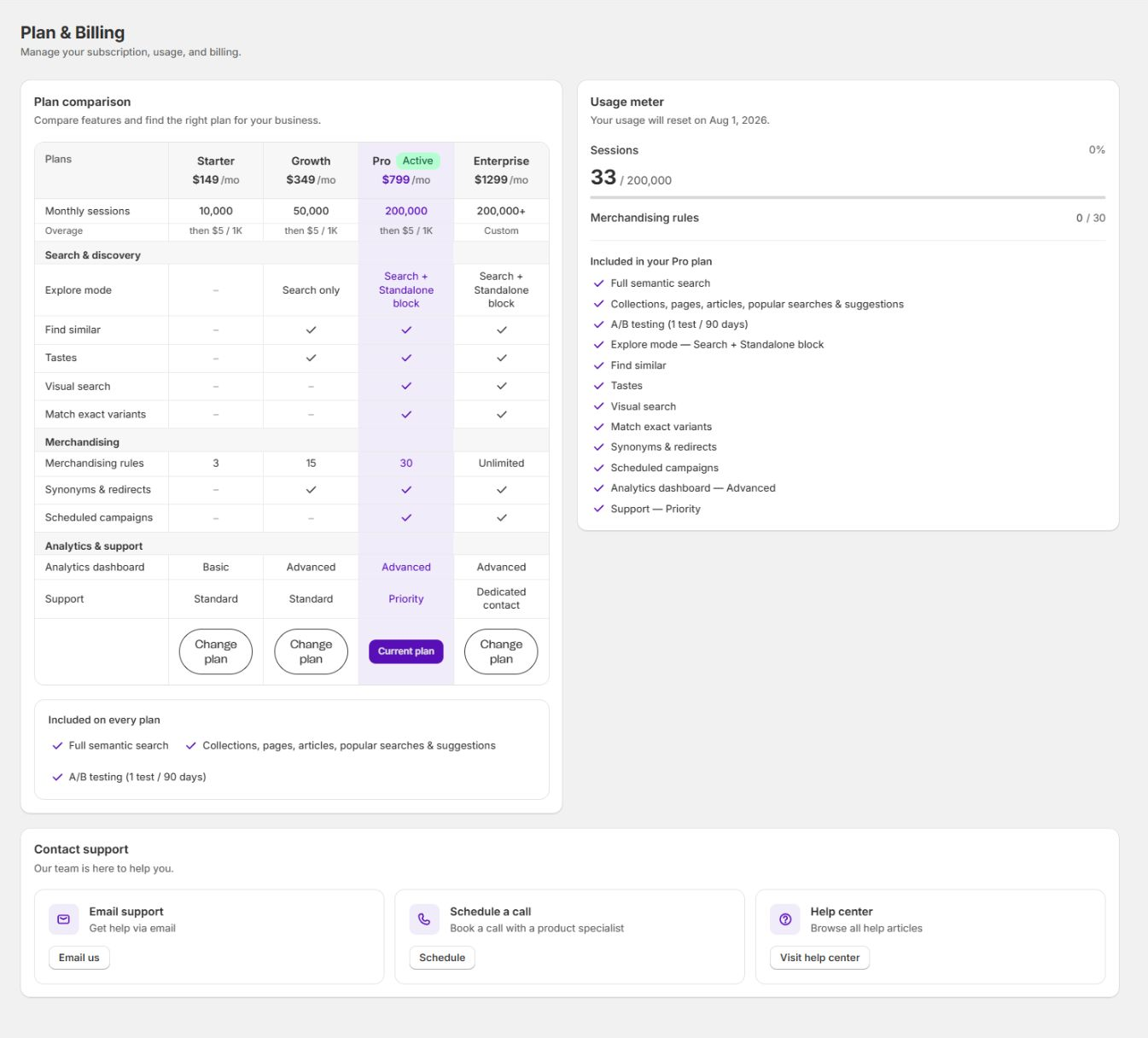
Section titled “Compare plans”The comparison table lists all plans. Your current plan is marked Active.
VIBE has four plans:
| Plan | Price | Monthly shopper visits | Overage | Usage cap per billing cycle |
|---|---|---|---|---|
| Starter | $149 / mo | 25,000 | then $5 per 1,000 | $50 |
| Growth | $349 / mo | 100,000 | then $5 per 1,000 | $150 |
| Pro | $799 / mo | 400,000 | then $5 per 1,000 | $300 |
| Enterprise | $1,299 / mo | 1,500,000 | No usage overage | None |
Prices are in USD and renew every 30 days. The usage cap is the extra usage limit you approve in Shopify when you subscribe. Overage above the cap is waived.
Feature rows are grouped by:
- Search and discovery: Explore mode, the standalone Explore block, Find similar, Tastes, Visual search, and Match exact variants.
- Merchandising: how many result rules you can create (Starter 3, Growth 15, Pro 30, Enterprise unlimited), plus synonyms and redirects on higher plans.
- Analytics and support: Basic or Advanced analytics, and Standard, Priority, or Dedicated support.
Every plan also includes full meaning-based search; collections, pages, articles, popular searches, and suggestions; and one A/B test every 90 days.
New subscriptions that qualify get the 7-day trial shown during Shopify approval. Whether your store still qualifies is checked automatically as part of that approval.
Change your plan
Section titled “Change your plan”- Find the plan you want and select Change plan under it.
- Review the subscription change Shopify shows you.
- Approve it in Shopify.
How to check it worked: the plan you chose is marked Active and Current plan on this page.
These match the terms Shopify shows you at approval. Starter, Growth, and Pro have two line items: the recurring price, billed every 30 days, and a usage line billed at $5 per 1,000 shopper visits above your allowance in a calendar month (UTC). The usage line is capped per billing cycle at $50 on Starter, $150 on Growth, and $300 on Pro, which is the amount you approve when you subscribe. Anything above that cap is waived. Enterprise has one line item, the recurring price, with no usage line and no overage. The 7-day trial is available once per store.
Track your usage
Section titled “Track your usage”The Usage meter shows where you stand this calendar month:
- Sessions used against your plan’s monthly allowance, with the percentage used and the date your usage resets. The VIBE admin calls each shopper visit a session.
- Merchandising rules (your result rules) used against your plan’s limit.
- Included in your plan, a list of included features.
Your visit allowance resets at 00:00 UTC on the first day of each month. Shopify renews your subscription every 30 days from your approval date. Usage resets and Subscription renews show these separate dates. Changing plans does not erase visits already counted this month.
For Starter, Growth, and Pro, your highest applicable allowance during the month remains available through month end. An upgrade increases it immediately; a lower allowance begins next month. Moving into or out of Enterprise, or cancelling and resubscribing after visits have been counted, waives that month’s usage overage. If an existing overage cannot be safely matched to its approved subscription, automatic charging pauses for review.
When the durable usage meter first starts for an existing installation, earlier counts are kept for reference and are not charged. The new count starts at zero with the full monthly allowance. Monthly summaries show the month they cover and the amount actually charged. Any amount above Shopify’s available usage cap is waived, not carried forward.
How shopper visits and overage work
Section titled “How shopper visits and overage work”Shopper visits are the basis for VIBE’s billing. VIBE counts a visit as soon as it loads for a real shopper on your storefront, whether or not they search or use Explore; the same visit is only counted once, no matter how many searches, clicks, or Explore actions happen inside it. A visit ends after 30 minutes without activity. Every plan includes a monthly visit allowance. Starter, Growth, and Pro bill visits above that allowance at $5 per 1,000. Enterprise has no usage overage. Your count resets at the start of the next calendar month in UTC. If an A/B test is running, visits in the control group (shoppers seeing your theme’s native search) aren’t counted.
If you need help with billing, the Contact support card at the bottom of the page has your support options.
Billing questions
Section titled “Billing questions”What happens when I reach my shopper-visit limit? Search keeps working. On Starter, Growth, and Pro, visits above your included allowance are billed at $5 per 1,000 when usage billing is active. Enterprise has no usage overage. The count resets at the start of the next calendar month in UTC.
How is a shopper visit counted? VIBE counts a visit as soon as it loads for a real shopper on your storefront, not only when they search or use Explore. Further searches, clicks, and cart adds during that same visit don’t add to the count. Visits in the control group of an active A/B test (shoppers seeing your theme’s native search) aren’t counted.
Can I change plans at any time? Yes. Select Change plan on the plan you want and review the change in Shopify.
If something looks wrong beyond what’s covered here, see Diagnose search and storefront problems.