Search relevance and ranking
Relevance means showing the products that best answer what a shopper is looking for right now. Ranking is the order those products appear in. VIBE combines several signals, then applies your controls, filters, availability choice, and rules.
Use this guide when a product shows up but appears in the wrong position, or when you need to decide whether to fix the Shopify data, adjust how VIBE reads your products, change an Explore control, or add a result rule.
Check whether VIBE can show the product first
Section titled “Check whether VIBE can show the product first”VIBE can only rank a product if it’s allowed to show it and the product is already in VIBE’s copy of your catalog. Before you look at scores, confirm the product:
- Is Active in Shopify.
- Is published to the Online Store.
- Is not hidden from search engines.
- Does not match a VIBE product, collection, or tag exclusion.
- Is handled as expected by the out-of-stock setting.
- Has finished updating in VIBE’s copy of your catalog.
If the product never appears for its exact title, start with Sync and Index, not a boost or pin rule.
The main relevance signals
Section titled “The main relevance signals”Keyword matching
Section titled “Keyword matching”Keyword matching rewards close text matches between the search and the product data in VIBE’s copy of your catalog. It is especially important for:
- Product names.
- Brands and vendors.
- Product types.
- Model numbers.
- Material names.
- Variant options.
- Specific collection or category terms.
Use clear Shopify titles and descriptions for literal searches. A synonym helps when shoppers consistently use a different term for the same thing.
Meaning-based matching
Section titled “Meaning-based matching”Meaning-based matching compares what a search means, not just its exact words. It helps with natural, descriptive searches such as:
light jacket for raingift for a new apartmentminimal dining chairwarm neutral artwork
Meaning-based matching is only as good as the product information in VIBE’s copy of your catalog. If many everyday searches return weak results, review how VIBE reads your products and your source data before creating lots of individual rules.
Structured product data
Section titled “Structured product data”Product type, vendor, collections, tags, options, availability, price, and other structured values give VIBE factual context.
Structured data supports relevance, but it isn’t the same as exact filtering. A meaning-based search can lean toward blue products; a color filter should only show products that actually carry that color in the data VIBE uses for filtering.
Variants
Section titled “Variants”When variant search is turned on, VIBE can match exact sizes, colors, styles, or other options separately, not just at the product level.
Variant search is useful when shoppers search for a precise combination and the product-level record is too broad to tell those options apart.
Turning on variant search means VIBE keeps a separate searchable record for every variant, not just every product, so a catalog with many options takes more work to keep up to date. Variant search also requires the plan shown in VIBE’s Sync and Index settings.
Images
Section titled “Images”When image matching is turned on, your product photos, and optional context photos, can contribute to visual similarity.
- Product photos should clearly represent the item.
- Context photos can add environment, styling, model, room, or detail information.
Image matching helps visual and style searches. It should not replace accurate text and structured data for factual product attributes.
When a product has variants, each variant uses its own image if Shopify supplies one. Otherwise it falls back to the main product image.
What shoppers can adjust in the moment
Section titled “What shoppers can adjust in the moment”Explore controls
Section titled “Explore controls”Explore controls let a shopper express a preference while they search.
- A slider balances two concepts.
- A toggle chooses between two concepts.
- A single control strengthens one concept.
Controls change ranking just for that shopper, right now. They do not change VIBE’s copy of your catalog or permanently change relevance for everyone else.
Starting collection
Section titled “Starting collection”A starting collection narrows Explore to a chosen group of products. It’s useful when a shopper starts from a department or theme before adjusting preferences.
Shopify filters
Section titled “Shopify filters”Filters apply exact rules. If a shopper selects size M, products without that value are removed from the results.
Use filters for facts. Do not create an Explore control to imitate stock, price, or exact option filtering; use a filter instead.
Out-of-stock handling
Section titled “Out-of-stock handling”The Configuration tab provides three approaches:
- Hide removes sold-out products from shopper results.
- Show last keeps them discoverable but moves them behind in-stock items.
- Mix in allows normal relevance to position them.
This setting can explain why a sold-out item that matches well in meaning is missing, or ranks below weaker in-stock results.
How result rules change natural relevance
Section titled “How result rules change natural relevance”Use Boost when a product or group is relevant but should receive additional business priority.
Good examples:
- Favor a new collection for a broad category search.
- Give higher visibility to an owned brand.
- Support a seasonal campaign while keeping other relevant results.
Do not use Boost to make an unrelated product appear relevant.
Use Bury when a product is technically relevant but should appear later.
Good examples:
- De-emphasize low-margin alternatives.
- Move clearance items down without hiding them.
- Keep an older model searchable behind a newer model.
Use Pin when a specific product must occupy a fixed position for a matching search.
Pin is the strongest placement decision. Use it sparingly because it can displace products that would otherwise rank naturally.
Behavioral ranking
Section titled “Behavioral ranking”Behavioral ranking uses how shoppers have responded to that same search before, to reorder close matches. It helps most when several products are similarly relevant and real shopper behavior adds a useful signal.
It should refine close candidates, not compensate for missing catalog data.
Synonym
Section titled “Synonym”Use a synonym when different words should be treated as equivalent.
Examples:
- trainers, sneakers
- sofa, couch
- handbag, purse
Do not create synonyms for merely related concepts. Treating dress and jacket as equivalent would reduce precision.
Redirect
Section titled “Redirect”Use a redirect when the best answer is a destination rather than a product result list.
Examples:
returnsto a returns-policy page.summer saleto a campaign collection.gift cardsto the gift-card page.
Redirects bypass normal result ranking for the matching search.
Rule priority and conflicts
Section titled “Rule priority and conflicts”More than one rule can match the same search. Priority determines which decisions apply first, or which rule wins where actions conflict.
When debugging:
- Filter the rules table on the Result rules page by the type you’re checking.
- Search for the query or trigger.
- Check whether each rule is active and within its schedule.
- Review target products, groups, and position.
- Review priority and reorder if necessary.
- Test the exact search again.
Avoid creating a second rule until you understand the first matching rule.
How to read Search Preview
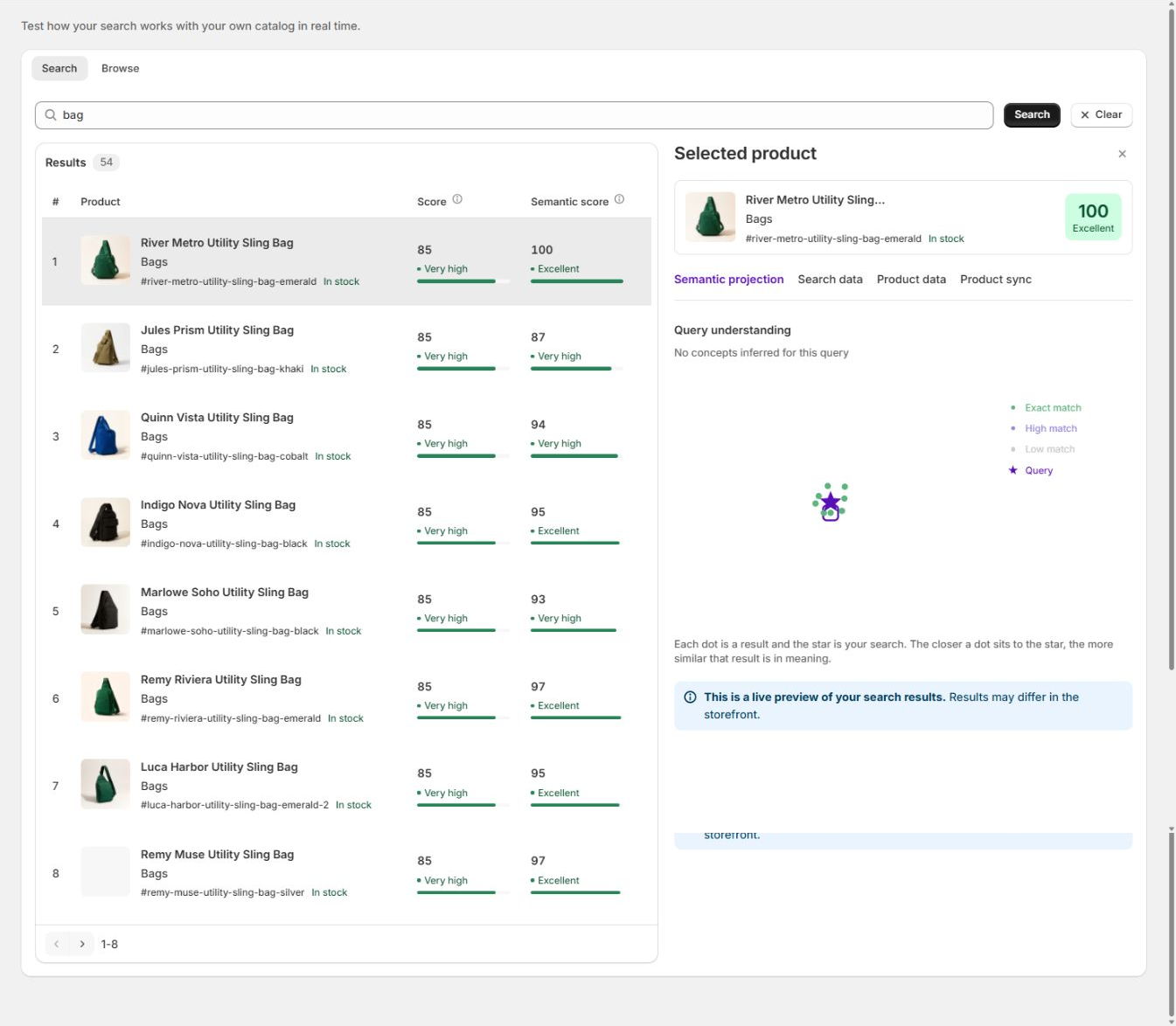
Section titled “How to read Search Preview”Search Preview shows two numbers for every result: the overall Score, and the Semantic score, how close the product is to the search in meaning.
- A high overall score can reflect a strong combination of matching words, close meaning, and other ranking signals.
- A high Semantic score means the product is close to the search in meaning.
- A product can have a good Semantic score but still rank lower because another product has stronger combined evidence.
- A product can match the literal words but still be a poor shopper answer if its source data is misleading.
The selected-product panel shows the data VIBE actually has for that product, and whether its copy is current. Use it to check what VIBE has, instead of assuming a recent Shopify edit has already reached VIBE.
Choose the smallest correct fix
Section titled “Choose the smallest correct fix”| Symptom | Best first action |
|---|---|
| Product never appears for its exact name | Check whether VIBE can show it, and update VIBE’s copy of your catalog |
| Many everyday searches are weak | Review source data and how VIBE reads your products |
| Shoppers use another word for the same product | Add a synonym |
| One campaign product needs more visibility | Add a scoped boost or pin |
| A relevant product should remain searchable but lower | Add a bury rule |
| A search should open a collection or information page | Add a redirect |
| An Explore preference has little effect | Improve the control concepts |
| Exact size or color searches are weak | Review your variant setup and Shopify options |
| Visual similarity is weak | Review your image sources and update VIBE’s copy of your catalog |
| Storefront differs from Preview | Check controls, filters, rules, language, and theme mode |
A disciplined relevance test
Section titled “A disciplined relevance test”For every important search, test:
- An exact known product name.
- A broad category.
- A natural-language description.
- A common synonym.
- A variant option.
- A collection name.
- A misspelling or short prefix.
- A search that should return no products.
Record expected top products before changing anything. Change one layer at a time and repeat the same set so the improvement is measurable.