A/B testing
The A/B Test page compares VIBE with Shopify’s native search. During a test, shopper visits are split between the two.
What you can do here
Section titled “What you can do here”- Start or stop a test.
- Watch a test’s progress while it runs.
- Read the final result once it ends.
- See how many days remain in the cooldown between tests.
What the test compares
Section titled “What the test compares”A test runs two groups at the same time:
- VIBE Search (Variant A) gives shoppers the full VIBE search experience.
- Shopify Search (Variant B) gives shoppers your theme’s native search instead. For this group, the VIBE switch in your theme is turned off, so they use your store’s built-in search exactly as it would behave without VIBE.
Both groups are measured on the same metrics, so you can compare them directly.
Shopper visits in the Shopify Search (Variant B) group aren’t billed as VIBE visits, since those shoppers see your theme’s native search, not VIBE. See Plan and billing for how visits are counted.
How the traffic splits
Section titled “How the traffic splits”While a test runs, VIBE assigns each shopper visit to one of the two groups, aiming for an even 50/50 split. The assignment is made per visit and stays consistent for that visit, so a shopper never flips between VIBE and native search mid-visit. Because the split depends on who arrives during the test, the two groups are rarely exactly 50.0/50.0; the Sessions percentage on each card shows the actual split you collected.
Start a test
Section titled “Start a test”- Open the A/B Test page.
- Select Start A/B Test. This button only shows when no test is running and you’re not in the cooldown period.
- Confirm: VIBE tells you that 50% of traffic will use Shopify native search for comparison.
How to check it worked: the page shows a Running badge and starts collecting data. You can have only one test running at a time.
While a test runs
Section titled “While a test runs”The page shows:
- Searches collected toward the 4,000 target, and the day counter.
- Estimated finish date, based on your store’s current search rate.
- Split health, confirming the 50/50 split is within the expected range.
- The two variant cards, VIBE and Shopify, with their live metrics.
How the test ends
Section titled “How the test ends”The test ends automatically when it collects 4,000 searches (it always runs at least 7 days), or at 14 days, whichever comes first. When it ends, VIBE returns all traffic to VIBE Search, saves a permanent results snapshot, and emails you a summary.
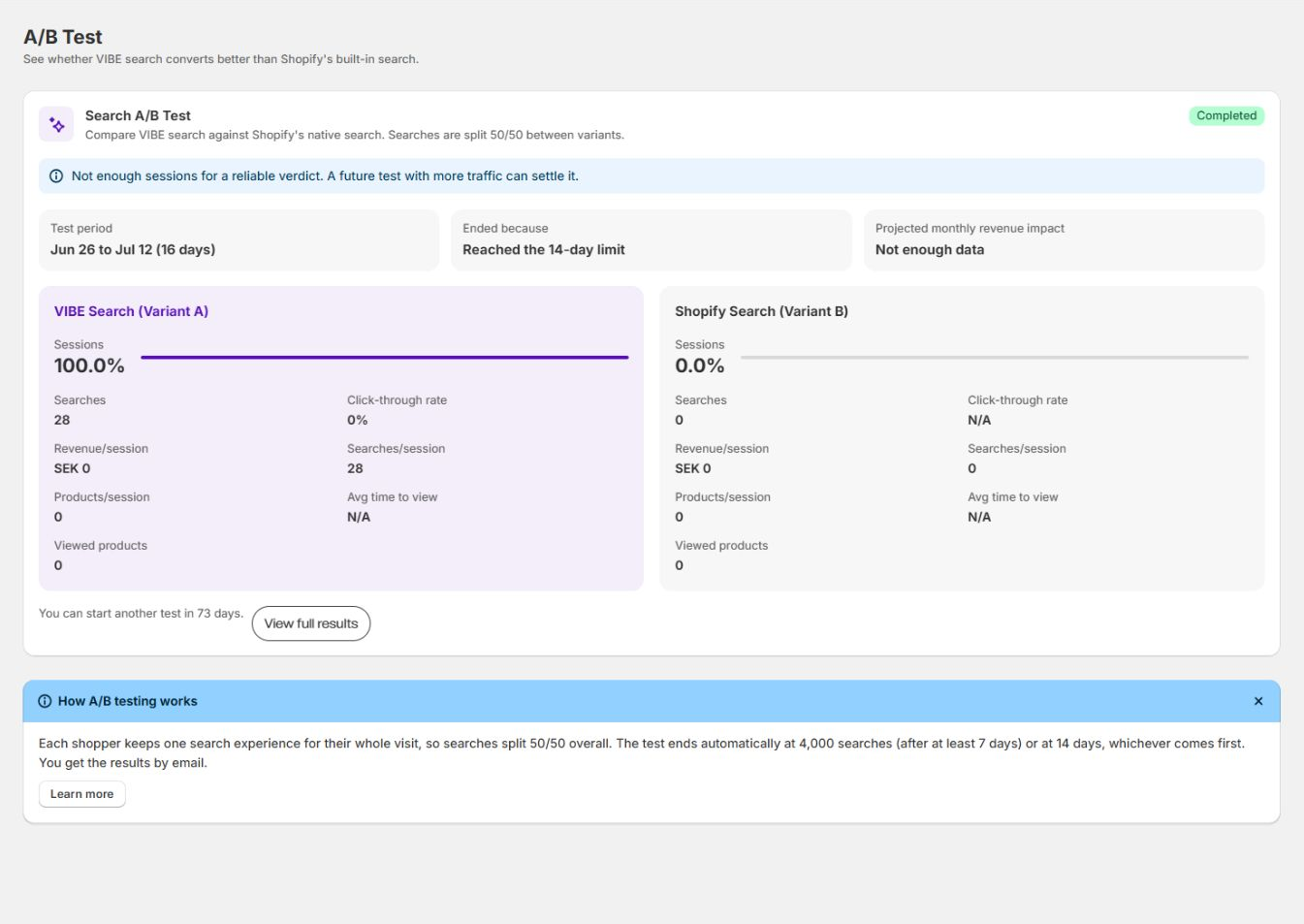
A completed test shows the Test period, why it ended, whether there was enough data for a reliable verdict, both variant summaries, and when you can run another test. Select View full results for the detailed comparison.
Stop a test early
Section titled “Stop a test early”- Select Stop test.
- Confirm: VIBE tells you that all traffic now uses VIBE Search.
How to check it worked: the control group is turned off and every shopper returns to the VIBE experience. Stopping a test early starts the 90-day cooldown before you can run another.
Cooldown
Section titled “Cooldown”After a test ends, whether automatically or early, there’s a 90-day wait before you can start another. During the cooldown, the page shows how many days remain instead of the Start button. The cooldown stops rapid stop-and-restart, which would split traffic unevenly and make the comparison unreliable.
Read the results
Section titled “Read the results”While the test runs, the results page shows live progress. After it ends, it shows the final snapshot:
- Verdict: which variant won (shown only when there’s enough data for a reliable read).
- Projected monthly revenue impact (shown only when there’s enough data for a reliable read).
- Funnel comparison: add-to-cart rate and conversion rate side by side.
- Full metric table: every tracked metric for VIBE Search, Shopify Native, and the difference between them.
| Metric | What it means |
|---|---|
| Sessions | Distinct shopper visits in the group during the test. |
| Searches | Searches performed by the group. |
| Searches per session | Average searches per shopper visit. |
| Click-through rate | Share of searches that led to a result click. |
| Add to cart rate | Share of searches that led to an add-to-cart. |
| Conversions | Converting result clicks credited to the group. |
| Conversion rate | Converted clicks as a share of the group’s searches. |
| Revenue | Revenue credited to the group’s converted clicks. |
| Revenue per session | Average revenue credited per shopper visit. |
| Products per session | Average number of distinct products viewed in a visit. |
| Average time to view | Average time before a shopper opens a product. |
| Viewed products | Number of distinct products viewed by the group. |
VIBE only shows a Verdict and Projected monthly revenue impact when the difference between the two groups is large enough, given how many searches were collected, to be confidently more than random variation. A test that ends early or on a low-traffic store may finish without enough data for a reliable read, even though it still shows the full metric table.
If there isn’t enough data for a reliable read, the verdict and revenue impact are withheld and the page explains why. If native search wins, review your Explore controls and Result rules before drawing conclusions.
Test status
Section titled “Test status”The badge tells you where a test stands: Not started (none has run yet), Running (collecting data now), or Completed (finished, with results to review). A completed test’s results stay visible during the cooldown.
Recommendations
Section titled “Recommendations”- Let the test run to completion when possible. It ends at 4,000 searches or 14 days.
- Avoid major changes during a test. Catalog, control, or rule changes affect only the VIBE variant and reduce how comparable the two groups are.
- If native search wins, review your Explore controls and Result rules before concluding, since those shape how VIBE ranks and surfaces products.
Troubleshooting
Section titled “Troubleshooting”Some shoppers see the old Shopify search during a test. Is that a bug? No, that’s the test working. While a test runs, about half of shoppers are in the control group and see your theme’s native search by design, so the two can be compared. To preview VIBE yourself regardless of group, use Search Preview, or stop the test to put everyone back on VIBE.
When does the test end automatically? When it collects 4,000 searches (minimum 7 days), or at 14 days, whichever comes first.
When can I trust the result? The verdict and projected revenue impact only show when there’s enough data for a reliable read. If the sample is too small, the page says so.
Why can’t I start a test? You can run only one test at a time, and there’s a 90-day cooldown after a test ends. During the cooldown, the page shows how many days remain instead of the Start button.
If something looks wrong beyond what’s covered here, see Diagnose search and storefront problems.